Thứ Sáu, 1 tháng 8, 2014

Use validator to validate xml against a shema

Demo: Create a program that accepts two command line parameters. The first parameter must specify the name of an XML document and the second parameter must specify the name of a schema. The program should validate the XML document against the specified schema by creating a DOM source on the
document.
Bước 1: Tạo new project


Bước 2: Tạo file shiporder.xml


Bước 3: Tạo file shiporder.xsd


Bước 4: Viết code cho file main


kết quả


Demo: https://drive.google.com/file/d/0B-EFzewQLSMDc2pDd2dmeWRYV1E/edit?usp=sharing

Demo :Create a program that accepts two command line parameters. The first parameter must specify the name of an XML document and the second  parameter must specify the name of Schema. The program must also validate the XML document against the specified schema by creating a SAX source on the 
document.

Bước 1: Tạo new project


Bước 2: Tạo file shiporder.xml


Bước 3: Tạo file shiporder.xsd

 
Bước 4: Viết code cho file main
code DefaultHandler


code chạy chương trình


- Validator là một cách cao hơn để kiểm soát lỗi của một file xml
- Nó không chỉ check xem một file xml có thực sự chuẩn theo quy tắc hay không, nó còn kiểm tra một file xml có thỏa mãn một schema nào đó hay không
- Chương trình được an toàn hơn

Validate xml in SAX

Demo 1: Create an application, which demonstrates the generation of an error during parsing an XML document. Write the code for handling different types of errors and exceptions. Define an endDocument() method to override the contentHandler. Declare a method to override the error method of errorhandler.


Bước 1: Tạo new project


Bước 2: Tạo file tomcat-users.xml


Bước 3: Tạo trang HandlerReader.java

Bước 4: Viết code cho file main


Kết quả:


Demo: https://drive.google.com/file/d/0B-EFzewQLSMDMW9xMDR0MC0taDA/edit?usp=sharing

Demo 2: Create an application, which demonstrates the implementations of DTDHandler interface methods. As the DefaultHandler implements the DTDHandler interface, you need to override the desired methods of DTDHandler interface.

Bước 1: Tạo new project


Bước 2: Tạo file note.xml

Bước 3: Tạo file TagDTDHandler.java

Bước 4: Viết code cho file DTDHandlerDemo.java để chạy chương trình


Kết quả:


Demo: https://drive.google.com/file/d/0B-EFzewQLSMDcjJGLXAtYnE3TU0/edit?usp=sharing

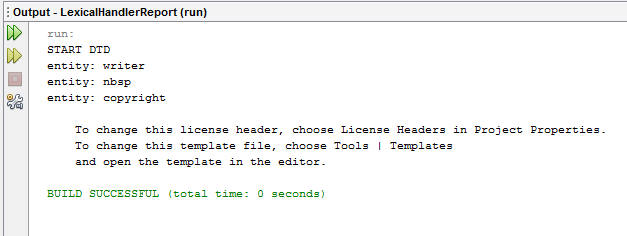
 Demo 3: Create an XML file Report.xml that contains the sales data for this financial year. Create an application that demonstrates the implementations of LexicalHandler interface methods .The application should display the number of entities, CDATA, and comments in the Report.xml document.

Bước 1: Tạo new project


Bước 2: Tạo file Report.xml


Bước 3: Viết code cho file main

Các mothed


Code chạy chương trình

Kết quả


Demo: https://drive.google.com/file/d/0B-EFzewQLSMDdnh2cWZodDMzZDQ/edit?usp=sharing

Nhận xét:
- Các lớp override trong DefaultHandler giúp SAX kiểm soát lỗi dữ liệu tốt hơn
- Ứng dụng sẽ được kiểm soát và an toàn hơn
- Việc xây dựng web sẽ trở nên đơn giản và tối ưu hơn

Describe technologies to apply xml into web application

1. Generating XML Data from Databases


-Chúng ta có thể dùng rất nhiều các kỹ thuật khác nhau
+Dùng SQL để lấy dữ liệu từ database
+Sau đó dung Xpath, XQuery, DOM, SAX

2.Transforming Data into HTML


-Có 3 cách để transform dữ liệu sang dạng HTML
+Client-Side Transformation: Chuyển dữ liệu có dạng XML hoặc HTML đến client. Sau đó, client sẽ dùng XSLT để biến đổi sang dạng tương ứng
+Server-Side Transformation: Ngay trên server đẽ biến đổi sang dạng tương ứng rồi chuyển đến client
+External Transformation: Chúng ta sẽ có một ứng dụng khác để làm việc biến đổi dữ liệu

3. Transforming Data into PDF


-Nguồn dữ liệu đầu vào là duy nhất XML, sau đó có thể involves ra các định dạng khác nhau
-Cụ thể, trong PDF, chúng ta có thể dùng XSL-FO

4. Importing\Exporting XML Data


-Chúng ta hoàn toàn có thể dùng các bộ công cụ khác nhau để import hoắc export dữ liệu vào database và ngược lại

5.Validating Well-Formdness
-Chúng ta phải kiểm tra xem XML có đúng định dạng hay không
-Các bước để kiểm tra
 + Kết nối , phân tích dữ liệu XML
 + Tạo SchemaFactory
 + Nạp W3C XML schema
 + Phê chuẩn DOM tree
 + Kiểm tra lỗi

Nhận xét:
-Hiện nay, XML rất phổ biến và quen thuộc
-Chúng ta có thể dễ dàng biến đồi XML sang các định dạng khác như HTML để phục vụ cho công việc của chúng ta
-Code làm việc trong XML sử dụng như database cũng rất đơn giản và gọn gàng
-Chúng ta cũng có nhiều cách để kiểm tra tính hợp lệ của XML

Thứ Năm, 31 tháng 7, 2014

Use Xpath

Demo: In an organization, five hundred employees are working. Out of which some are apprentices. The Delivery Unit Head of that organization gave you the responsibility to develop a software, with which you can find the details of apprentices. Use the below files to develop the application: 
1. The EmployeeDatabase.xml file holds the data of all employees. 
2. Use XPath expressions. 
In this application, the apprentices are defined in the trainee namespace while all other employees are defined in the default namespace. This application should count the number of apprentices and print their details on the user console.

Bước 1: Tạo new project


Bước 2: Tạo file EmployeeDatabase.xml có sử dụng Namespace


Bước 3: Viết code cho file main
code tạo Document kêt nối XML


code kiểm tra Namespace


Code tạo Xpath


Kết quả:


Demo: https://drive.google.com/file/d/0B-EFzewQLSMDd2Zpa2Z5QnN3UG8/edit?usp=sharing

Nhận xét :
-Hiện nay, Xpath có vai trò rất quan trọng trong quá trình trao đổi thông tin, dữ liệu
-Sử dụng Xpath, ta sẽ dễ dàng truy cập vào các node trong XML bằng cách viết các câu lệnh đơn giản và đặt điều kiên trong các câu lệnh
-Cú pháp khai báo cũng khá đơn giản và ngắn gọn
-Xpath cho phép ta chọn lựa những thông tin, dữ liệu nào mà ta muốn chuyển


Use Trax to tranform xml document

Demo : Create an application, which accepts an XSLT file as its first argument and XML document as second argument. Then, create an application using the following classes, which transforms a Source and sends the output to a Result object. 
1. Use the TransformerFactory class and its methods. 
2. Use the Transformer class and its methods.

Bước 1: Tạo new project


Bước 2: Tạo file employees.xml


Bước 3: Tạo file employeesStyle.xml
code CSS:


code sắp xếp dữ liệu theo username


code lấy dữ liệu


Bước 4: Viết code cho file main


Kết quả


Demo: https://drive.google.com/file/d/0B-EFzewQLSMDLV9KQjFkWjNXM2c/edit?usp=sharing

Nhận xét
-Việc chuyển đổi XML thành các định dạng khác là rất cần thiết và quan trọng hiện nay
-Nó được coi là một trong những đặc tính cơ bản của file XML.
-Việc chuyển đổi cũng khá dễ dàng và nhẹ nhàng
-Việc chuyển đổi sẽ rất có ích khi bạn muốn gửi dữ liệu cho ai đó